Is CTRTool Good for Customizable User Behavior? A Review
You can set a 45-second visit and a desktop user agent, but you cannot script curiosity. Customizable click behavior is the promise every CTR campaign tool makes, and it is also where most of them quietly fall short.
This review breaks down what CTRTool actually lets you control, from desktop versus mobile campaigns and keyword targeting to clicked links and visit duration. By the end, you will know where its customization stops and whether it fits your campaign.
What Is CTRTool? The CTR Campaign Platform Defined
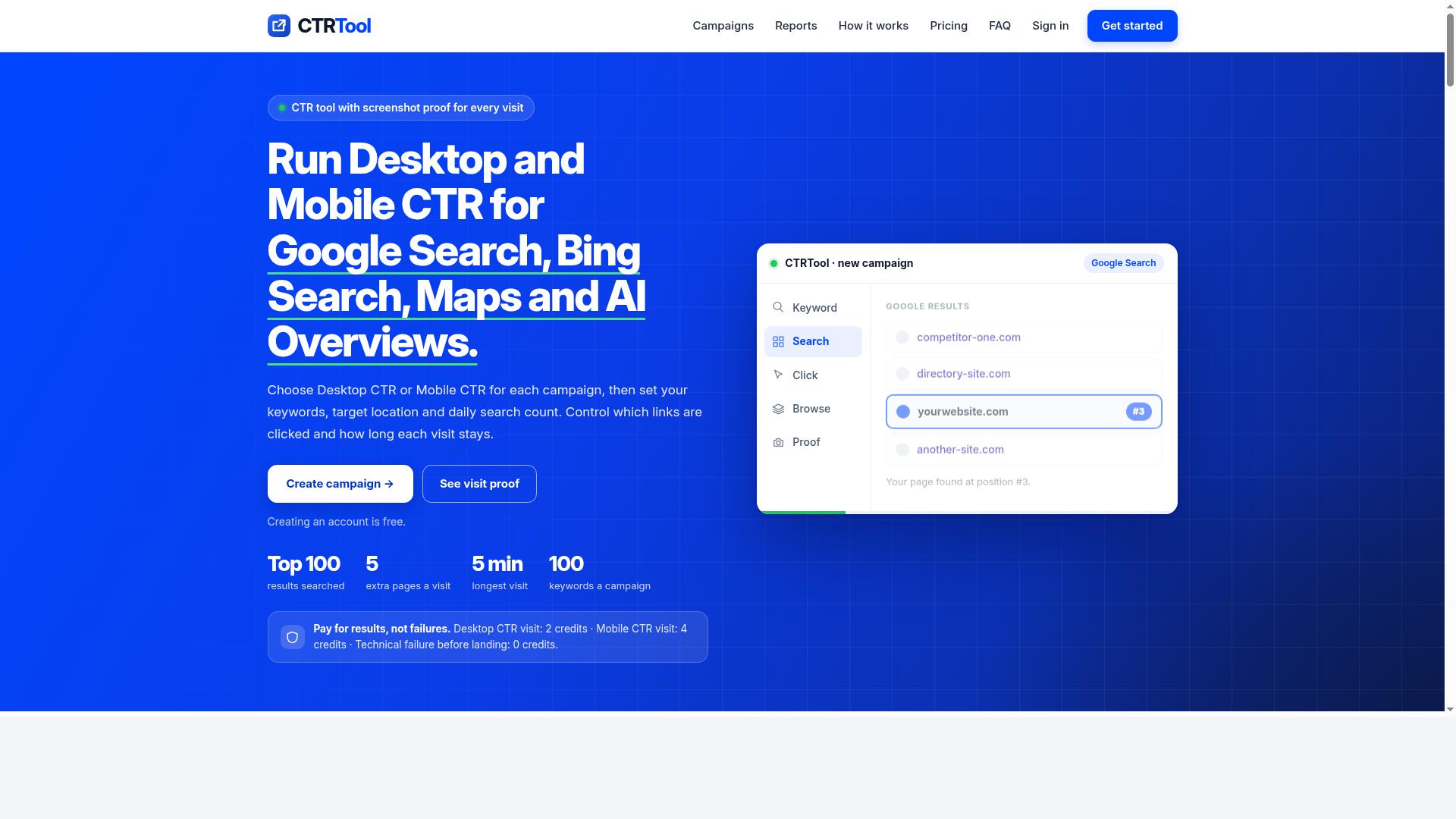
CTRTool is a SaaS platform that runs click-through-rate (CTR) campaigns for Google Search, Bing Search, Google Maps, and AI Overviews, providing screenshot proof for every visit. In one line, it runs campaigns that simulate organic clicks so a page can build CTR signals that may support stronger SERP ranking over time.
The core function is organic traffic emulation. Instead of sending generic bot traffic, the platform runs campaigns that mimic real searchers clicking a target result. Each campaign can be pointed at specific keywords, locations, and daily search volumes, which is what separates a structured CTR campaign from a blunt traffic blast.
That structure matters for anyone thinking about customizable user behavior. CTR manipulation only becomes useful when the clicks look plausible: the right keyword, the right geography, the right pace. CTRTool frames its campaigns around those variables rather than raw volume alone.
The platform's own positioning is a CTR tool with screenshot proof for every visit. That proof angle is central to how it differentiates itself, because it lets campaign owners verify that visits actually happened rather than trusting a dashboard counter. For a CTRTool review, that is the claim worth weighing first.
Who CTRTool Serves and Which Channels It Covers
CTRTool is built for SEO practitioners and agencies managing CTR campaigns for their own or client websites across Google Search, Bing Search, Google Maps, and AI Overviews. The site's guidance points these users toward tier links, PBNs, and test properties, and advises using CTR on main sites with caution.
Each channel serves a different job:
- Google Search for organic keyword clicks on a ranking page
- Bing Search for the same keyword-driven approach on Microsoft's engine
- Google Maps for local listing engagement where proximity and clicks shape visibility
- AI Overviews for the answer surfaces now appearing above standard results
Campaigns can be narrowed to a country, state, and city, or set to "Any country" for a mixed geographic spread. That level of geotargeting supports the behavioral customization angle: a local business and a national publisher need very different click patterns to look natural.
The audience definition is deliberately narrow. This is a tool for people who already understand CTR campaigns and want control over targeting, not a general traffic service. Agencies managing multiple client sites benefit most, since campaigns can be organized per property and per keyword set.
That focus also explains the caution in the brand's own guidance. Recommending tier links, PBNs, and test properties first signals a platform meant for practitioners who test carefully before touching a money site. For readers asking whether CTRTool is good for customizable user behavior, the answer starts here: it is purpose-built for controlled, targeted click campaigns across four distinct search surfaces.
Is CTRTool Good for Customizable User Behavior? The Direct Answer
Yes, CTRTool offers strong customization for user behavior simulation, but it focuses on search-driven visits rather than broad bot traffic generation. If your goal is to shape how a visitor arrives, searches, clicks, and lingers, the platform gives you detailed controls over each step of that journey.
The tool is built around CTR manipulation through realistic search sessions. You define the keyword, the device, the location, and the pages a visitor touches, and CTRTool executes that path. That makes it a focused organic traffic emulation tool rather than a general-purpose traffic bot.
This distinction matters for anyone running an SEO tool evaluation. A general traffic bot might send volume to a URL, but it rarely models the search-to-click sequence that shapes user engagement metrics like dwell time and session duration. CTRTool is designed around that sequence instead.
The verdict is clear: CTRTool is effective for customizable search behavior, covering keywords, devices, locations, and visit paths. It does not provide full-spectrum bot traffic, so expectations should match its search-centric scope. The next section breaks down exactly where the customization is strongest and where it stops.
Where CTRTool's Customization Is Strongest - and Where It Stops
CTRTool excels at customizing search keywords, device type (Desktop or Mobile), geographic location, daily search count, and full visit paths including clicked links and visit duration. These controls map closely to the signals that matter in search engine optimization work.
Keyword handling is granular. A campaign supports up to 100 keywords, with search depth up to 100 results, so a visit can be modeled against the top 100 results rather than just the first page. You also set the target URL, internal page URLs, and the link text to click.
Geotargeting goes beyond country level. Campaigns can target a country, state, or city, or any country, and delivery runs through Desktop Chrome windows and real Android phone sessions matched to the target location through managed proxy routes. This supports device emulation and geotargeting in a single campaign setup.
Timing and visit behavior are equally adjustable. You control daily search counts with now, spread out, or gap timing, plus days, hours, and time zone, with daily goals resetting at 00:00 UTC. Visit paths allow click order, scrolling time, up to five additional pages per visit, and visits of up to five minutes total. Reports then show full visit paths, search and website screenshots, and keyword positions over time.
The limits are just as important to understand. CTRTool does not offer mouse movement simulation, user agent spoofing, referrer control, proxy rotation for IP diversity, or captcha bypass. Custom form filling or other custom actions are available through support with a separate agreed one-time fee. Readers weighing traffic quality should treat these as scope boundaries, not defects.
The platform also extends beyond standard search. Bing Search CTR follows the same model, Google Maps CTR can find a business listing and click its website link across up to 50 listings with city targeting, and AI Overview CTR can find a website in the overview and click its source link. Together these show where CTRTool's behavioral customization is deepest: structured search journeys, not broad-spectrum bot traffic.
How CTRTool Lets You Control User Behavior
CTRTool provides granular controls for simulating organic search behavior, from device and keyword selection to visit paths and duration. Instead of sending generic traffic at a page, it lets you shape how each visit looks, which is exactly what customizable user behavior should mean in a CTR tool.
The platform supports several campaign types, each matched to a different search surface:
- Google Search CTR, where a visitor searches a keyword and clicks an organic result
- Bing Search CTR, following the same logic on Bing
- Google Maps CTR, where the visitor finds a business listing and clicks its website link
- AI Overview CTR, where the visitor finds your site in the overview and clicks its source link
Every campaign is built around a keyword your page already ranks for. CTRTool requires the page to sit in the top 100 organic results for the chosen keyword and location, which keeps campaigns tied to realistic search scenarios rather than invented ones.
From there, you adjust device type, location, daily search volume, clicked links, and time on page. Each of those settings feeds directly into how natural the resulting sessions appear, and the subsections below break them down one by one.
Desktop vs. Mobile CTR, Keywords, Location and Daily Search Count
Users can choose between Desktop and Mobile CTR campaigns, specify target keywords, set a country/state/city, and define daily search counts to mimic natural traffic patterns. These four settings form the foundation of any campaign, so it is worth understanding what each one does before building a visit path.
Device type is a campaign-level choice. Desktop and Mobile are separate campaign types, and CTRTool delivers them differently: Desktop campaigns run through Chrome windows, while Mobile campaigns use real Android phone sessions matched to the target location through managed proxy routes. That split matters because mobile and desktop searchers behave differently, and mixing them would blur your results.
Keywords are the anchor of every campaign. You can add up to 100 keywords per campaign, and each one must return your page within the top 100 organic results for the targeted location. Search depth is also configurable up to 100, so you control how far down the results the simulated visitor is willing to look.
Location targeting goes beyond a single country. You can set country, state, and city, or choose "Any country" when geography does not matter. For local SEO work, this is the setting that makes geotargeting meaningful rather than cosmetic.
Daily search count controls volume. You can set daily goals and choose whether searches happen now, spread out, or with gaps, along with days, hours, and time zone. Daily goals reset at 00:00 UTC, which keeps scheduling predictable.
A practical example: a local plumbing company targeting "plumber Austin" could run a Mobile campaign with 50 daily searches, city set to Austin, spread across working hours. That produces a steady, geographically plausible pattern instead of a sudden spike.
Controlling Clicked Links, Visit Duration and Full Visit Paths
CTRTool allows users to define which internal links are clicked, how long visitors stay on each page, and the full sequence of pages visited within a session. This is where behavioral customization moves past simple click counts and into genuine user behavior simulation.
Each campaign lets you set a target URL, internal page URLs, and the link text to click. You choose the click order and scrolling time, and you can add up to five additional pages per visit. Visits can last up to five minutes in total, giving you room to build a believable journey.
Visit duration is set per page. A visitor might spend 30 to 120 seconds on one page before moving on, depending on what you configure. A typical multi-page path could look like this:
- Homepage, with a short scroll and a pause
- Product or service page, with a longer dwell time
- Blog post, reached through an internal link
Paths like these matter because they shape user engagement metrics. Longer dwell time and multi-page sessions suggest an engaged visitor, while a quick bounce tells search engines the opposite. By controlling the sequence, CTRTool lets you present sessions that look like real interest rather than a single hit and exit.
Verification is built in. Reports include full visit paths alongside search and website screenshots as separate proof images, so you can check that the journey you configured actually happened. Under the pay-for-results credit model, technical failures before landing are not charged, and visits that cannot verify the requested location use no credits.
Keyword positions are also tracked over time, including Maps listing order and AI citation order, which helps you judge whether the customized behavior is moving your SERP ranking in the intended direction. For a review focused on control, this combination of configurable paths and recorded proof is the strongest part of the CTRTool offering.
Proof and Tracking: What You Can Actually Verify
Every CTRTool visit generates screenshot proof, separate search and landing page images, along with full visit paths and keyword position tracking over time. This is the core of what separates a verifiable campaign from a hopeful one. Instead of trusting a dashboard counter, you get artifacts you can open, inspect, and compare against your own analytics.
The value here is auditability. When traffic generation is built on organic traffic emulation, the natural question is whether the visits actually happened the way you specified. CTRTool answers that with evidence per visit rather than a summary number.
Search and landing screenshots as separate images. Each visit produces two distinct proof images. The search screenshot captures what the visitor saw on the results page, and the landing screenshot captures the destination page as it loaded. Keeping them separate matters because it lets you confirm both halves of the journey: the query context and the actual arrival.
For anyone running CTR manipulation campaigns, this is a practical check. You can scan a batch of screenshots and see whether the requested keyword, device, and location context line up with what was recorded.
Full visit paths. Beyond the entry point, CTRTool records the sequence of pages visited and how long each one lasted. That gives you a view of dwell time and session duration as they actually played out, not as they were configured.
- The pages a visit touched, in order
- Time spent on each page
- Visits of up to 5 minutes with up to 5 additional internal pages
This level of detail supports traffic quality review. A visit that lands and leaves in seconds looks very different from one that moves through several pages, and the path record shows you which you received.
Keyword position tracking over time. CTRTool tracks keyword positions as a time series, including Maps listing order and AI citation order. That extends SERP ranking visibility beyond the classic blue links into local and AI-driven result surfaces.
Tracking over time is what makes the data useful. A single snapshot tells you where you stand; a trend line tells you whether a campaign is moving anything. You can align position changes with campaign activity and judge whether the behavioral customization you set is producing the engagement pattern you wanted.
Campaign reports. Reports pull the individual proofs into a campaign-level view. That is where you audit at scale: confirm visits occurred as specified, spot patterns in visit paths, and cross-reference position movement.
The credit model reinforces the same principle. CTRTool uses a pay-for-results structure with no credits charged for technical failures before landing, and visits that cannot verify the requested location use no credits. In other words, you are not billed for proof you did not receive.
For a CTRTool review focused on customizable user behavior, this is the deciding factor. Behavioral settings only mean something if you can verify the resulting visits, and the screenshot, path, and position records give you exactly that. The verdict is clear: CTRTool is a legitimate, verifiable tool for teams that want evidence, not just claims, behind their traffic.
Pricing and Plans
CTRTool offers monthly plans in USD: Starter at $59/month for 2,000 credits (up to 1,000 Desktop CTR visits or 500 Mobile CTR visits) and Growth at $125/month for 5,000 credits (up to 2,500 Desktop or 1,250 Mobile visits). Both tiers are built around a credit system, so the cost you pay maps directly to the volume of visits you can run.
For anyone evaluating how customizable user behavior fits a real budget, the plan structure matters as much as the feature list. Larger campaigns get two more options: Scale at $399/month for 20,000 credits and Agency at $699/month for 40,000 credits. The Growth plan is marked Recommended on the site.
| Plan | Price | Credits | Desktop Visits | Mobile Visits |
|---|---|---|---|---|
| Starter | $59/month | 2,000 | Up to 1,000 | Up to 500 |
| Growth (Recommended) | $125/month | 5,000 | Up to 2,500 | Up to 1,250 |
| Scale | $399/month | 20,000 | Up to 10,000 | Up to 5,000 |
| Agency | $699/month | 40,000 | Up to 20,000 | Up to 10,000 |
The credit math is straightforward. A Desktop CTR visit costs 2 credits and a Mobile CTR visit costs 4 credits. A verified search without a match costs 1 credit, and a technical failure before landing costs nothing.
That last point matters for a review of customizable user behavior. Credits are pay-for-results: you are only charged for completed visits with proof, not for attempts that never landed. For a tool centered on traffic generation and behavioral customization, that keeps spending tied to actual outcomes.
Two practical details round out the pricing picture. Unused credits roll over while a subscription is active and expire when cancellation takes effect, so timing a downgrade or pause deserves some thought. Creating an account is free, and custom development carries a separate, agreed one-time fee.
The site also notes limited launch pricing, with prices set to rise 30% on November 15. For buyers comparing tiers, the Growth plan's 5,000 credits sit in a reasonable middle ground for testing desktop and mobile campaigns side by side.
Trust Signals and the Pay-for-Results Credit Model
CTRTool builds trust through its pay-for-results credit model: users are only charged credits for visits that are completed and verified with screenshot proof. That single design choice changes how a buyer should read the whole offer. Instead of paying upfront for promised traffic, you spend credits against visits the platform can actually show happened.
The billing logic is specific about when credits are not deducted. Technical failures that occur before a visit reaches the landing page cost nothing, and visits that cannot verify the requested location also use no credits. In practical terms, a failed attempt is not billed as a delivered result.
For anyone weighing a CTRTool review against the wider SEO tool evaluation market, this is the core trust argument. The model aligns cost with proof rather than with effort or intent, which is a meaningful distinction for buyers comparing traffic generation services.
Proof is the backbone of the credit model, and CTRTool treats it as a first-class output rather than an optional extra. Every visit is backed by screenshot proof, with search screenshots and landing screenshots delivered as separate proof images. That separation matters because it lets you confirm both the entry point in the results page and the actual arrival on your page.
Beyond snapshots, the platform records full visit paths, so you can see the route a session took rather than a single isolated frame. Keyword positions are tracked over time, including Maps listing order and AI citation order, which ties the traffic activity back to measurable SERP ranking movement.
Together these signals give a reviewer something concrete to audit. You are not asked to take delivery on faith. The evidence trail is the product.
CTRTool also enforces a relevance rule that shapes how campaigns can be configured. Pages must sit in the top 100 for the target keyword before they qualify for a campaign. This prevents the tool from being pointed at pages with no connection to the search term, which protects both the plausibility of the behavior and the value of the data you collect.
The rule has a practical upside for traffic quality. Campaigns are anchored to pages that already have some footing in the results, so the activity stays tied to genuine keyword context instead of random URLs. For a buyer assessing customizable user behavior, that constraint reads as a guardrail rather than a limitation.
It also keeps expectations honest. If a page does not rank within the top 100, the tool will not pretend a campaign can fix that. You know the boundary before you spend anything.
The commercial structure is deliberately simple, and the absence of hidden fees is part of the trust story. There is one credit balance shared across all campaign types, websites and keywords, so you are not juggling separate wallets or plan-specific allowances. Capacity runs up to 100 campaigns with 100 keywords each.
Visits can last up to 5 minutes and include up to 5 additional internal pages, which supports realistic dwell time and session depth. Unused credits roll over while you remain subscribed, so a quiet month does not wipe out your balance. For readers comparing CTRTool against vague promises elsewhere, these are checkable terms rather than marketing language.
Read together, the credit model and the proof trail answer the question this review set out to test. CTRTool is a credible option for customizable user behavior precisely because it bills only for verified delivery and shows its work on every visit.
Who Should Use CTRTool
CTRTool is best suited for SEO practitioners and agencies running CTR campaigns for their own or client websites across Google Search, Bing Search, Google Maps, and AI Overviews. These users already understand how CTR manipulation fits into a broader search engine optimization strategy. They are not looking for a magic switch, but for a tool that gives them control over campaign behavior.
The platform's guidance also mentions using tier links, PBNs, and test properties alongside campaigns. That detail matters because it points to users who manage multi-layered link and traffic setups, not beginners running a single site. Agencies in particular can benefit from customizable user behavior settings that let them shape how each campaign runs.
Several groups get the most value from the tool:
- SEO professionals who want to influence click-through rate and SERP ranking for targeted keywords
- Agencies managing campaigns for multiple client properties under one workflow
- Site owners focused on improving visibility for competitive terms in their niche
- Local SEO practitioners running Maps campaigns for location-based visibility
For local SEO, the Google Maps focus is a natural fit. Practitioners can run campaigns aimed at map pack visibility, where click behavior and engagement signals tend to shape how listings surface. Competitive keyword targeting is another common case, since users can direct campaigns at terms where organic rankings are hardest to shift through content alone.
AI Overviews add a newer use case. As those summaries take up more space in results, practitioners want to understand how engagement patterns around them behave. CTRTool's stated support for AI Overviews gives agencies a way to include that surface in their campaign planning rather than treating it as a blind spot.
CTRTool is not built for those seeking full bot traffic simulation. If your goal is replicating mouse movements, handling captcha bypass, or building a general-purpose traffic bot, this is the wrong category of tool. CTRTool sits in the CTR campaign space, where the emphasis is on behavioral customization tied to search results rather than synthetic browsing at scale.
That distinction is important for SEO tool evaluation. Buyers often confuse click automation platforms with traffic generation suites, then judge them on the wrong criteria. If you need granular control over campaign behavior across search surfaces, CTRTool fits. If you need a broader bot framework, look elsewhere. For its target audience, the scope is deliberate and the fit is clear.
Final Verdict
CTRTool delivers a focused, verifiable solution for customizable search behavior, making it a strong choice for SEOs who need proof-backed CTR campaigns. It does not try to be everything to everyone. Instead, it concentrates on the elements that matter most for search-driven click-through rate work: precise targeting and evidence that the campaign actually ran.
The customization layer is where CTRTool earns its place. Campaigns can be shaped around keywords, devices, locations, and visit paths, which gives practitioners real control over how customizable user behavior is expressed. That control matters because CTR manipulation only produces meaningful user engagement metrics when the traffic looks like it belongs to the target query and audience.
Equally important is the proof. CTRTool backs campaigns with verifiable screenshots and visit paths, so results can be checked rather than taken on trust. For agencies reporting to clients, that evidence trail is often the difference between a tool that gets renewed and one that gets dropped at the first review.
The limitations are just as clear. CTRTool does not offer advanced bot features such as mouse movement simulation or captcha bypass. Buyers who expect deep human-like behavior emulation or automated challenge handling will need to look elsewhere, or accept that this tool draws a deliberate line around what it does.
Who should consider it? SEO practitioners and agencies running search-focused CTR campaigns are the natural audience. If your priority is controlled, customizable search behavior with proof attached, CTRTool fits the brief well. If your priority is heavy bot emulation, it is the wrong fit, and knowing that upfront saves time.
For questions before or after a purchase, the support email listed in the FAQ is vaibhav@autoblogging.ai. No phone number, physical address, or opening hours are stated on the site. Account and policy pages include Sign in, Create an account, Support, Terms of use, and Legal notices.
Overall verdict: CTRTool is a credible, purpose-built option for customizable search behavior with verifiable results. It is recommended for SEO practitioners and agencies that value targeting control and proof over broad bot feature sets.
Frequently Asked Questions
What makes CTRTool suitable for customizable user behavior campaigns?
CTRTool lets you choose Desktop CTR or Mobile CTR per campaign, set your own keywords, and target a specific country with an optional state and city (or "Any country" for a mix of supported locations). Campaigns can run across Google Search, Bing Search, Maps and AI Overviews, so you can tailor behavior patterns per platform rather than relying on one generic setup. Every visit also comes with screenshot proof, so you can verify the customization worked as intended.
Can I run separate campaigns for different search engines and platforms?
Yes. CTRTool supports distinct campaign types: Google Search CTR, Bing Search CTR, Google Maps CTR and AI Overview campaigns. Each type follows its own rules - for example, Maps campaigns check up to 50 listings (about five pages), and AI Overview campaigns require a matching source link. This lets you customize behavior per platform instead of forcing everything into a single campaign format.
How does CTRTool prove that visits actually happened?
CTRTool provides screenshot proof for every visit, with search and landing screenshots delivered as separate proof images. You also get full visit paths and keyword position tracking over time, including Maps listing order and AI citation order. This makes it easy to audit results and confirm campaigns behaved as configured.
How much does CTRTool cost, and how do credits work?
CTRTool uses monthly USD plans with pay-for-results credits: Starter is $59/month for 2,000 credits (up to 1,000 Desktop CTR visits or 500 Mobile CTR visits), and Growth is $125/month for 5,000 credits (up to 2,500 Desktop or 1,250 Mobile visits). Because Desktop and Mobile visits consume credits at different rates, you can match your plan to the behavior mix you want to run.
What are the requirements for a campaign to work?
Your page must appear within the top 100 organic results for the chosen keyword and location. Maps campaigns check up to 50 listings (about five pages), and AI Overview campaigns need a matching source link. Meeting these requirements up front helps ensure your customized campaign runs as planned.
Who is CTRTool designed for, and how do I get support?
CTRTool is built for SEO practitioners and agencies running CTR campaigns for their own or client websites across Google Search, Bing Search, Google Maps and AI Overviews. The site's guidance also mentions tier links, PBNs and test properties as part of campaign strategy. For help, you can reach support at vaibhav@autoblogging.ai.